Wednesday, 1 January 2014

Django – 2 Basic View and URL configuration

Django – 2 Basic View and URL configuration.

this blog just gives a very small and simple hello world style webpage over Django framework.
 

Define a function called hello

And save it to the testproject folder as helloworld.py

from django.http import HttpResponse

def hello(request):
return HttpResponse("Hello world")

this is the business logic of your webpage output.

Change the urls.py and let it call hello function.


    from django.conf.urls import patterns, include, url

    # Uncomment the next two lines to enable the admin:
    # from django.contrib import admin
    # admin.autodiscover()

    from testproject.helloworld import hello

    urlpatterns = patterns('',
        url(r'^hello/$','testproject.helloworld.hello',name='hello'),
    )
         
The most import line is url(r'^hello/$','testproject.helloworld.hello',name='hello'),


  • r'^hello/$' is the regular expression when you try to access the page via the browser
  • 'testproject.helloworld.hello’ is the [project].[module].[function]
  • name='hello' is just to give a name to the view.


The urls.py plays a very import role in Django framework, it mapps the url to the python scripts that provides the logic.

So when you run the server by python manage.py runserver 0.0.0.0:8080
And access the page by http://192.168.56.112:8080/hello/

You will get the page look like


ARP in brief


ARP in brief

Address Resolution Protocol (ARP) is a telecommunications protocol used for resolution of network layer addresses into link layer addresses, a critical function in multiple-access networks. When IP a package reaches the subnet of the destination, it has to be delivered to the destination host via Ethernet (Mac) address instead of using IP. The ARP protocol provided the translation from IP address to hardware address.

ARP package  format.


Detailed field explanation:
Hardware type (HTYPE): This field specifies the network protocol type. Example: Ethernet is 1.
Protocol type (PTYPE): This field specifies the internetwork protocol for which the ARP request is intended. For IPv4, this has the value 0x0800.
Hardware length (HLEN): Length (in octets) of a hardware address. Ethernet addresses size is 6.
Protocol length (PLEN): Length (in octets) of addresses used in the upper layer protocol. address size is 4.
Operation : Specifies the operation that the sender is performing: 1 for request, 2 for reply. The request and response for ARP is the same package format except this OP field.
Sender hardware address (SHA): media address of the sender.
Sender protocol address (SPA): internetwork address of the sender.
Target hardware address (THA): media address of the intended receiver. This field is ignored in requests.
Target protocol address (TPA): internetwork address of the intended receiver.

Procedure in brief.

When the sender host wants to know what is the mac address of a IP address. It will send an ARP request via broadcast. All the hosts in that broadcast will receive the request, but only the target host will send the response to the requestor directly, thus the sender will know the target IP/Mac mapping correctly.
#the procedure how the sender got the ARP entry


#the procedure how the requestor got the ARP entry.


To summer up, the basic ARP protocol is very simple and straightforward.

Some other concerns about ARP.


Imcompleted ARP.

When the host is not on the subnet (either not configured or not started), the sender will get an imcompleted ARP record as below.

ARP cache.
The arp entry will be cached in the OS (router, hosts) for further usage. Also it helps to reduce the broadcast traffic on the LAN. It depends on how the OS implemented the cache. By default,  the entry will be cached for half an hour and the imcomplete ARP will be cached for 3 mims.

ARP proxy.

When the target host is in a different network than the sender host, the router in between the subnets will work as a proxy, that is it will send the requestor his MAC address , acting as the target host. So the sender will think it as the destination.  When the sender sends the packages to the router , the router should forward it to the host over the other network.


ARP command.

arp command is very helpful.
//show all arp entries
#arp -a
//add arp static entries
#arp –I [interface]  -s [ip] [mac]
//remove arp static entries
#arp –d [IP]

//arping commands
arping command is to issue the arp requests to a IP address.
arping [options] IP

Basic SQL Select statement - 1 (need to change the layout)


Basic SQL Select statement - 1

The blog is for a basic illustration about Select statement , all the examples are tested in MYSQL 5.6.

Basic Select:

Select [field1,field2] from [table-name];


Order clause:
Order clause is to make the  output order by the specified field.
Order by [field] [ASC| DESC]


 By default , it is ‘ASC’ ascend
With the limit clause, we can just see the limited number of output.


Filter using where clause.

When we want to filter the output , we can use where clause.
Where can be combined with the below operations.


Some sample.

1.       List the price < 10 $

Eg: where prod_price < 10


2.       List the vendor is not 1003

Eg: where vend_id <> 1003


3.       Check the email is NULL

Eg: where cust_email is NULL


AND, OR, IN operators

When we need multiple where clauses, we can use AND, OR to combine them
For example, we want to list all products produced by 1003 or 1002 , and the price is less than 10.
where (vend_id = 1002 or vend_id = 1003) and prod_price < 10;


Alternatively, we can use
where vend_id in (1002, 1003)and prod_price <10;


Like (% _) wildcards.

We can use ‘like’ predicate and ‘%’ ‘_’ to do wildcards matching in where clause.
  • %: matching any characters (repeated)
  • _: matching any single character.
For example, we want to find out the product name like ‘jet%’ (jet1, jetpack 1000, jet)
Where prod_name LIKE ‘jet%

Attention : use wildcards inproperly may cause serious performance problem, especially % is used as the beginning searching pattern.

Tuesday, 31 December 2013

Linux process memory in detail

Linux process memory in detail


Linux provides detailed information about how a process using the memory. But it could be difficult for a System Admin to understand the difference among the items used by Linux.

There is a program as below:
#include <stdio.h>
#include <stdlib.h>
#include <sys/types.h>
#include <unistd.h>

void func()
{
    int *parray=NULL;

    if((parray=(int *)malloc(100*sizeof(int)))==NULL)
        printf("failed/n");
    else
    {
        pause();
    }
    return ;
}

int main()
{
        printf("pid: %d\n", getpid());
        func();
        return 0;

}

Run it and the process will pause there.

That’s the output of the 
#top –p [pid]


  • VIRT (VSZ): is the virtual memory for the process. But it does not mean the memory is used by the process now. For example, malloc just allocated some memory but the program hasn’t used it. The kernel will only map the virtual memory to the physical memory when it is really needed.
  • RES(RSS): the physical memory (not swapped)is being used by the program. Including the shared memory (shared lib or shard memory).
  • SHR: shared memory (shared lib or shard memory).  It does not necessarily mean that the entire library is resident. For example, if a program only uses a few functions in a library, the whole library is mapped and will be counted in VIRT and SHR, but only the parts of the library file containing the functions being used will actually be loaded in and be counted under RES.


Let’s look it into more detailed output using
#cat /proc/[pid]/status
Just focus on the memory section


  • VmSize: is the virtual memory VIRT (VSZ)
  • VmLck(KB): memory is locked and can’t be swapped. For example, the memory can be locked by munlock function in C.
  • VmHWM: the peak hardware memory usage by the process
  • VmRSS: the physical memory used by the process (RSS)
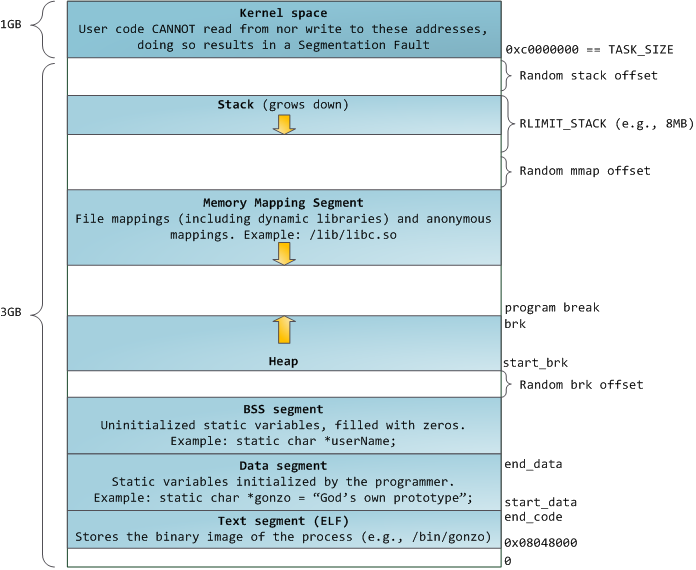
  • VmData: the program’s data segment. Related with program data
  • VmStk: the program’s stack segment. It contains automatic identifier, register variables, and function call information
  • VmExe: the program’s text segment. contains the executable program code and constant data
  • VmLib: Shared library code size.
  • VmPTE: Page table entries size.


A program memory table can be shown as below (from internet)