Showing posts with label Network. Show all posts

Saturday, 23 August 2014

The differnce between TCP and UDP

Notes to the blog:
http://www.javacodegeeks.com/2014/07/9-differences-between-tcp-and-udp-protocol-java-network-interview-question.html

This question what is the difference between TCP and UDP is often asked during the interviews. It is also important for sysadmin and program to understand for dairy work. Then we will explain what is the major differences we can see between the two protocols.

Connection-oriented vs Connectionless:

this is the essential differnce between TCP and UDP. The differnce also explains the other different points in the blog. when we say TCP is connection-oriented, it means the protocol itself controls and manages the connection session. It needs so-call 3-ways handshake and 4-ways termination. TCP also has many control packages such as SYN,ACK to for flow control. Meanwhile, UDP does not provide a 'connection' session for communication parties.

Reliability:

TCP is reliable as the application can assume TCP provides a reliable communication while UDP does not provide any  delivery guaruntee

Ordering:

TCP also guarantees order of message as it can get the sequence number from all the packages. while UDP does not care about the package sequence.

Data Boundary:

TCP does not preserve data boundary, UDP does.In TCP, data is sent as a byte stream, and no distinguishing indications are transmitted to signal message (segment) boundaries. On UDP, Packets are sent individually and are checked for integrity only if they arrived. Packets have definite boundaries which are honoured upon receipt, meaning a read operation at the receiver socket will yield an entire message as it was originally sent.

Speed:

In one word, TCP is slow and UDP is fast.

Heavy weight vs Light weight:

Because of the overhead mentioned above, Transmission control protocol is considered as heavy weight as compared to light weight UDP protocol. TCP header is longer than UDP headers.

Congestion or Flow control:

TCP does Flow Control. TCP requires three packets to set up a socket connection, before any user data can be sent. TCP handles reliability and congestion control. On the other hand, UDP does not have an option for flow control.

Different Applications:


because TCP and UDP provides different behaviour or characters, different application use either TCP or UDP as their transmission protocal. for example, HTTP and FTP, they use TCP while SIP, TFTP use UDP.

Tuesday, 10 June 2014

Advanced TCP topics - 0

Recently I read two interesting blogs from a Chinese engineer
http://coolshell.cn/articles/11564.html
http://coolshell.cn/articles/11609.html

He introduced some of the TCP advanced topics as:

TCP advanced technology:

1. TCP package format.
Key fields.
Sequence Number,
Acknowledgement Number,
Window,
TCP Flag

2. TCP status transition
    3-wayss handshake, 4-ways termination

3. Sequence number: how the sequence number is generated

4. TCP retransmission (Fast retransmit, SACK, etc)

5. TCP RTT (KP, JK)

6. TCP Sliding Window

7. TCP congestion handling (slow start, fast recovery etc )

I will write 7 blogs as the study notes to the articles in this week.

Wednesday, 8 January 2014

PING


 PING is a very useful command to test if the remote host is available and response time. As a system engineer, we need to understand how ping works.
Ping server (which responses the Ping request) is usually in the host’s TCP/IP stack.  You do not need to run any user program to enable the ping response. But you can disable it if you want to ‘hide’ your host.
#echo “1” > /proc/sys/net/ipv4/icmp_echo_ignore_all                               #disable echo response.

How PING works.

In brief, PING will use Internet Control Message Protocol (ICMP) Echo messages. The PING program will issue ICMP packages as below:
Note: the ICMP package is in the IP packages.


According to ICMP specification. Ping server should response the ICMP echo message if he gets the request. The response message is similar.
The fields in ping package we may be interested are:
Identifier: in unix/linux, the identifier is the PID of the ping client so when the echo response is back, the host can identify which client it is for.
Sequence number : the increasing sequence number for a
Timestamp: the timestamp is used to calculate the RTT in between the PING requestor and the response.

The PING (echo request)

The PING (echo response)

Common ping options:

Ping commands is like this:  ping [options] destination.
Common Options are:
·         -c counts : ICMP echo counters, ping test times.
·         -i interval: the interval of the ping echoes.
·         -s packetsize: the package size of the ping
·         -t ttl : the TTL options of the IP (not in ICMP)
·         -I interface: the interface where the ping is out.
·         -R: record the routing information.

Saturday, 4 January 2014

TCP Introduction – II


There are some other mechanisms we need to understand the TCP.

Interactive or bulk data flow:

Use interactive or bulk data flow is really depends on the applications. Some interactive application such as ssh/telnet or xwindow, it needs the server to give the feedback and response quickly. Other applications such as HTTP, the packages are meanling less unless all the packages arrive and put to the application. The formal is called interactive and the later one is called bulk.

Interactive data flow:

If TCP acknowledge every package, it will cause network congestion especially over WAN. So TCP will use Delayed Acknowledgement. It will try to combine the acknowledge with the next available application data. The delayed time is usually 200ms.
Nagle algorithm usually should be disabled. Nagle algorithm will try to combine tiny multiple application packages into a bigger package and send out. This algorithm will save transmission number. But it is not suitable for interactive data flow. The application can disable it by TCP_NODELAY.

Bulk data flow:

Bulk data flow is a little bit more complicated.


  1. usually TCP won’t acknowledge every package. A acknowledge is with the sequence number and it means acknowledge all packages before that sequence number.
  2. TCP uses sliding window to control the flow: the left side means the packages have been acknowledged. The right side means the packages have been transmitted but not acknowledged. Window Closes: acknowledgement is received. Window opens: data is delivered to the application.
  3. PUSH flag: it means the application data is finished. And it should be submitted to the application immediately.
  4. slow start: the sender will send just 1 package and wait for ack. If acked, it will send 2. if acked again, it will send 4. so it can use this method to test what is the limitation of the sending window. It will choose the min(congestion window, informing window) as the sending window.

Timeout and re-transmission

TCP timeout and retransmission is an important feature of TCP. When a package is sent, the TCP stack will start a timer, if no ack timeout, the TCP will resend the package.
TCP has a complicated method to estimate a suitable timeout value.

Different Timers

Retransmission Timer: used to control the sending packages. Tradictional value is 2*RTT. If received ack. Then send the next package and reset the timer, if not. Resend the package and reset the timer.
Persistent Timer: when the peer inform the sernder the window is 0, it means it can’t accept packages any more. Then the sender has to wait until the receiver sends ack to inform the resume. But the ack is probably lost in the network. So it can cause a deadlock. The sender wait for the ack, and the receiver wait for the new packages. The persistent timer is used to resolve the deadlock. When the persistent timer is timed out, the sender will send a window probe package to inform the receiver if he can start accepting new packages. Usually 60 seconds.

Keeplive Timer: used to test if the peer is alive of not. Usually 2 hours, if no application data is transferred, the server will send a probe package, if not acked after 10 times, server will terminated the TCP session.
Time_Wait Timer: after the last fin_ack, the connection is still in time wait status, the timer is usually 2*MSL.

TCP introduction - I


TCP is the core protocol in TCP/IP Stack. It provides a reliable transmission way over IP which is stateless and not reliable. Nowadays, most of the applications such as email(SMTP), web(HTTP) is based on TCP.

This blog together with the next blog will talk about TCP protocol in brief.

How TCP works:

  1. Application data is devided into TCP segments, the segments will be transferred over IP.
  2. when TCP segments are transferred to the peer, the sender will setup a timer, if it does not receive the response in time, it will resend the segment.
  3. when the receiver gets a segment, it will send back an ack to acknowledge it has received the package. The acknowledge probably is not sent immediately.
  4. TCP use checksum to check if the package is valid.
  5. TCP provides some kind of traffic control.

So the basic steps for a TCP transmission is:
l         Client/server establish the connections.
l         Sender sends packages to the receiver. Retransmission will be done if no ack is received.
l         Receiver use checksum to verify if the package is valid. If it is, it will send the ack to the sender.
l         Terminates the connections.

TCP establishment steps:

The dataflow to establish a connection

detailed status:
0: client is closed status and server is listening status.
1. client sends a ‘SYN’ package.
2. server receives ‘SYN’ and the ‘SYN+ACK’ package
3. client receives ‘SYN+ACK’ and sends ‘ACK’ package.

TCP disconnection steps:


There are other possibities about closing a connection. We just give one example.
Detailed steps:
  1. client sends a FIN to the server.
  2. server sends a ACK to the client.
  3. server sends a FIN to the client
  4. client sends a ACK to the server.
Note:
Half-close: after the socket shutdown the sending channel, it can still receive the application data from the peer. This status is called half-close (FIN_WAIT_2 status in the above diagram).
Time-wait: 2 times than the MSL (maximum segment lifetime).
Reason. 
1. the last ack probably not received by the server, then the server will resend the ack but if the client is already shutdown. The server will get the exception.
2. there may be multiple FINs from server to the client due to the network glitch. If the client has been shutdown and then receives a FIN, it will confuse the new TCP session.

Wednesday, 1 January 2014

ARP in brief


ARP in brief

Address Resolution Protocol (ARP) is a telecommunications protocol used for resolution of network layer addresses into link layer addresses, a critical function in multiple-access networks. When IP a package reaches the subnet of the destination, it has to be delivered to the destination host via Ethernet (Mac) address instead of using IP. The ARP protocol provided the translation from IP address to hardware address.

ARP package  format.


Detailed field explanation:
Hardware type (HTYPE): This field specifies the network protocol type. Example: Ethernet is 1.
Protocol type (PTYPE): This field specifies the internetwork protocol for which the ARP request is intended. For IPv4, this has the value 0x0800.
Hardware length (HLEN): Length (in octets) of a hardware address. Ethernet addresses size is 6.
Protocol length (PLEN): Length (in octets) of addresses used in the upper layer protocol. address size is 4.
Operation : Specifies the operation that the sender is performing: 1 for request, 2 for reply. The request and response for ARP is the same package format except this OP field.
Sender hardware address (SHA): media address of the sender.
Sender protocol address (SPA): internetwork address of the sender.
Target hardware address (THA): media address of the intended receiver. This field is ignored in requests.
Target protocol address (TPA): internetwork address of the intended receiver.

Procedure in brief.

When the sender host wants to know what is the mac address of a IP address. It will send an ARP request via broadcast. All the hosts in that broadcast will receive the request, but only the target host will send the response to the requestor directly, thus the sender will know the target IP/Mac mapping correctly.
#the procedure how the sender got the ARP entry


#the procedure how the requestor got the ARP entry.


To summer up, the basic ARP protocol is very simple and straightforward.

Some other concerns about ARP.


Imcompleted ARP.

When the host is not on the subnet (either not configured or not started), the sender will get an imcompleted ARP record as below.

ARP cache.
The arp entry will be cached in the OS (router, hosts) for further usage. Also it helps to reduce the broadcast traffic on the LAN. It depends on how the OS implemented the cache. By default,  the entry will be cached for half an hour and the imcomplete ARP will be cached for 3 mims.

ARP proxy.

When the target host is in a different network than the sender host, the router in between the subnets will work as a proxy, that is it will send the requestor his MAC address , acting as the target host. So the sender will think it as the destination.  When the sender sends the packages to the router , the router should forward it to the host over the other network.


ARP command.

arp command is very helpful.
//show all arp entries
#arp -a
//add arp static entries
#arp –I [interface]  -s [ip] [mac]
//remove arp static entries
#arp –d [IP]

//arping commands
arping command is to issue the arp requests to a IP address.
arping [options] IP

Monday, 30 December 2013

IP introduction


IP Introduction

This is the study note for TCP/IP illustrated Volume I: the protocols chapter 3.

The Internet Protocol (IP) is the principal communications protocol in the Internet protocol suite for relaying datagrams across network boundaries. Its routing function enables internetworking, and essentially establishes the Internet. IP, as the primary protocol in the Internet layer of the Internet protocol suite, has the task of delivering packets from the source host to the destination host solely based on the IP addresses in the packet headers. 

There are two features of IP:

  • Unreliable: it means by the protocol, the IP delivery is not reliable, you can’t relied on the IP to make sure it is delivered correctly. The upper layer protocol eg (TCP) will provide the reliability for applications.
  • Connectionless: it means the protocol itself doesn’t provide a virtual connection for IP peers. Every package delivery is independent of each other.

1.      IP header:


Explain of IP headers:
IP was designed decades ago and quite a few ideas are not used any more. Here is the explaination of each field. The important fields are marked as bold.

  • Version: IP versions , usually 4
  • Header length: usually be 5.
  • TOS: not very often used. Usually 0x00.
  • Total length: the length of the whole IP package.
  • Identification: the IP package’s Identification.
  • IP flags:  threee bits:
  • first is resvered,
  • the second means don’t do fragment on the package.
  • The third mean there are more fragments (not used very often) usually 0
  • Fragment Offset: the offset of the package start of whole IP datagram.
  • TTL:  Time to live field, usually the most router hops a package can usually travel. When it reaches 0, the router/host should discard the package.
  • Protocol: indicates the package type, eg TCP or UDP.
  • Header Checksum: the checksum of the IP header
  • Source Address: the source IP address of the package, who sent the package
  • Destination Address:  the destination IP address of the package. Who should receive the package.
  • IP options:  not very often used.


IP header sample


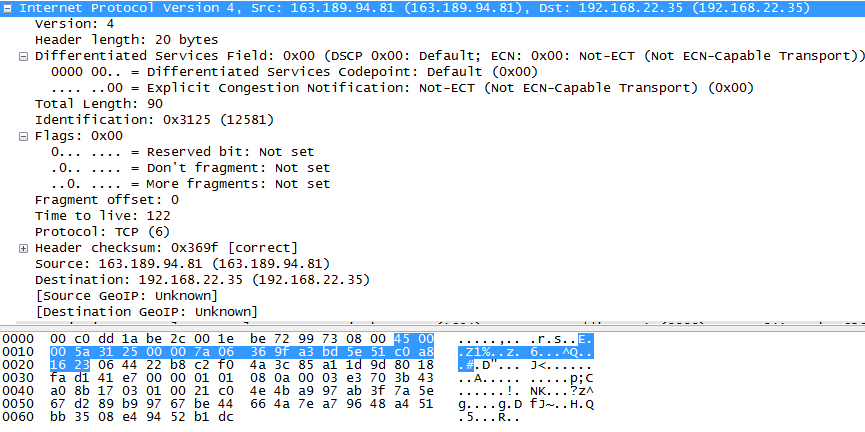
This is the IP package I captured


So we will see

  • Version: 4
  • Header length: 5
  • TOS: 000
  • Total length: 90  
  • Identification: 0x3125
  • IP flags:  000
  • Fragment Offset: 0.
  • TTL:  122
  • Protocol: 6 (TCP)
  • Header Checksum: 369F (correct)
  • Source Address: 163.189.94.81
  • Destination Address:  192.168.22.35
  • IP options:  not used.

 IP routing: 

IP packages are travelling and delivered in between hosts via the network, it travels hop by hop. The device which transmits the packages are called Router.
the router contains routing table. The routing table usually have the below information:
  • Destination : either it is a host or a network address
  • Next hop: the next hop router’s IP address
  • Interface : the physical interface the
  • Flag: indicates it is a router or an interface The router table may contains other useful information it needs.
Usually the router will try to match the destination IP with the routing table, if not found, it will match the network/netmask, if not found, it will use the default gw if there is or discard if not.  
  

Useful commands:

#ifconfig                     // the command to specify/show the interface IP information.
eg: ifconfig –a
     ifconfig eth0

              #netstat                               //show linux network relate info.
                eg: netstat –an                 //show all activated connections
                      netstat –l                       //show the listening ports.
                      netstat –r                     //show the routing table