Showing posts with label LINUX Kernel. Show all posts

Tuesday, 7 October 2014

linux tmpfs

tmpfs is a special file system used in Linux. Not like other traditional disk/partition based file systems, it store’s the file in memory. So it is much quicker than normal file system.
Then how can we use tmpfs? Well, we will just mount it as below:
#mount tmpfs –t tmpfs /var/tmp
Usually we can just add a size parameter to set the maximane size as
mount tmpfs -t tmpfs /var/tmp -o size=100m
we can do some test to write a 50M file there, then we can check the used memory increased, then we delete the file and the memory is freed
root@mysql:~# free -m
             total       used       free     shared    buffers     cached
Mem:          7985        290       7694          0         17        115
-/+ buffers/cache:        156       7828
Swap:         8187          0       8187
root@mysql:~# dd if=/dev/zero of=/var/tmp/zero.txt count=100000
100000+0 records in
100000+0 records out
51200000 bytes (51 MB) copied, 0.198847 s, 257 MB/s
root@mysql:~# free -m
             total       used       free     shared    buffers     cached
Mem:          7985        339       7646         49         17        164
-/+ buffers/cache:        156       7828
Swap:         8187          0       8187
root@mysql:~# rm /var/tmp/zero.txt
root@mysql:~# free -m
             total       used       free     shared    buffers     cached
Mem:          7985        290       7694          0         17        115
-/+ buffers/cache:        157       7827

Swap:         8187          0       8187

Monday, 5 May 2014

Linux Filesystem Hierarchy Standard(FHS)

Linux FHS or Filesystem Hierarchy Standard is the standard linux file system outlet across all distributions.

/boot:  boot related file such as
vmlinuz-2.6.32-279.el6.i686
initramfs-2.6.32-279.el6.i686.img
grub (directory, bootloader)

boot must be in a separated file system

/dev: the preudo file system to contain the device files
    block device: random access, data is organised as block
    char device: sequence access, data is organised as char.
each device is identified by a major and a minor.

/etc:contains the configuration files

/home:user home directory, usually it is /home/USERNAME

/root:super user's home directory

/lib:library files
static linked files .a
 dynamic linked files .so (shared object)
/lib/modules:kernel related modules

/media:mount point used for external device

/mnt:mount point used for temporary usage.

/opt:optional directory. often used by 3rd party program
/proc:preudo file system, used as kernel parameters mapping files.
/sys:preudo file system, used as hardware mapping files.
/temporary directory, another option is /var/tmp
/var:variable files
/bin: user level executable binaries
/sbin:super user's executable binaries

/usr:shared, read-only
/usr/bin
/usr/sbin
/usr/lib

/usr/local:third party program
/usr/local/bin
/usr/local/sbin
/usr/local/lib

Tuesday, 8 April 2014

Linux filesystem Introduction


In general linux file system has 3 parts
  • Superblock: it records the meta information for the linux filesystem. It contains the inode/iblock, amount, usage, free capacity and other file system information. The superblock information can be viewed by tune2fs
  • Inode. Record the file attributes. Every file will have a inode
  • Block: record the file content


Every file will use one inode and some blocks, the data will be allocated to the first block of the file, if it is over the block, then it will use the second block. Block can’t be shared between files

Inode contains the below information (most of information can be seen by stat file)
1.       permission
2.       ownership
3.       file size
4.       ctime, atime, mtime
5.       ACL
6.       file pointer

inode 3-layer index The inode use the 3 level table to contain the inodes mapping


Tuesday, 21 January 2014

Linux interview preparation - kernel internal

here are some questions I prepared for a technical internal. these are about the Linux internals. hope it will help all others needs them in future.

What is inode?
What is the super block of the file system?
What is the difference between softlink and hardlink?
What is the virtual memory and it’s advantage?
What is Linux user mode or kernel mode?
How many inter process communication ways?
In a 32 bit linux, how user space and kernel space are allocated. 64 bit?
How many file types:
How a process and thread is created in linux:
how syscall works:
What is copy-on-write:
How many locks in linux kernel.
What is preempt?
Explain the CFS:
Explain the linux kernel scheduler:
How does an interrupt work?
What is the top half and bottom half. List the ways of bottom half.
What is the memory zone in linux. How many zones
Explain the slab.
What is VFS and it’s function.
List the objects in VFS. List some of normal operations.
What is the Logical and Physical Address for a process.
Difference between thread and processes
Why can’t make hark links for directories
What is the page table in linux kernel and how it is implemented?

What’s the syscall for create a process

Saturday, 4 January 2014

VFS (Virtual File System)


VFS (Virtual File System) is an abstract layer in the OS. It provides the common File System interface for the user programs and kernel IO operations. The physical file system such as ext2, logic volume, FAT32’s detailed implementation is hidden by the VFS.

The VFS in OS is shown as below:

This diagram illustrates how a user IO function – write works in OS


The VFS have four major data structure:
Superblock : this data contains the file system control information.
Inode: file’s meta information.
Directory: file name and path information

File: opening file and the active information with the process.

Friday, 3 January 2014

LINUX BOOT PROCEDURE


Linux booting procedure is an important and interesting knowledge point for the system admin. It will help SA to understand how linux works and probably will help SA to recover a Linux system in emergency situation.

Basically a X86 Linux rebooting procedure as below:


Step 1: POST

It is usually called Power On Self Test (POST): it is the hardware checking: CPU, Memory, IO, network card. Etc. it is independent of the Linux booting. At the end of the process it Searches, loads, and executes the boot loader program. And give the control to MBR

Step 2: MBR

MBR stands for Master Boot Record.It is located in the 1st sector of the bootable disk. Typically /dev/hda, or /dev/sda
MBR is usually 512 bytes in size (1 sector of the disk). This has three components
  1. primary boot loader info in 1st 446 bytes (header of GRUB)
  2. partition table info in next 64 bytes
  3. mbr validation check in last 2 bytes.

It contains information about GRUB (or LILO in old systems).
It will executes the GRUB boot loader in the end.

Step 3: GRUB.

GRUB displays a splash screen, waits for few seconds, if you don’t enter anything, it loads the selected kernel image as specified in the grub configuration file.
Besides the title, and the root partition location, it contains kernel with parameters and initrd information.
title CentOS (2.6.32-279.el6.i686)
        root (hd0,0)
        kernel /vmlinuz-2.6.32-279.el6.i686 ro root=/dev/mapper/vg_hadoop-lv_root rd_NO_LUKS rd_LVM_LV=vg_hadoop/lv_swap LANG=en_US.UTF-8 rd_LVM_LV=vg_hadoop/lv_root rd_NO_MD SYSFONT=latarcyrheb-sun16 crashkernel=auto  KEYBOARDTYPE=pc KEYTABLE=us rd_NO_DM rhgb quiet
        initrd /initramfs-2.6.32-279.el6.i686.img

step4: KERNEL

In this stage: initrd (initial RAM disk)is used by kernel as temporary root file system until kernel is booted and the real root file system is mounted. It also contains necessary drivers compiled inside, which helps it to access the hard drive partitions, and other hardware 
then the OS will mount / file system and kick off /sbin/init – the pid 1 process in linux.

Step 5: INIT:

At this stage, init 1 process was kicked off.
Init identifies the default initlevel from /etc/inittab and uses that to load all appropriate program.

Step 6. RUNLEVEL

It will run the scripts according to the run level decided in previous steps.
It will also run /etc/rc.d/rc.sysinit.
In this stage, the kernel will do most of user related activites such as
  • Activated udev and selinux
  • Set kernel parmarmeters from /etc/sysctl.conf
  • Set system clock
  • Set swap
  • Set hostname/network
  • Mount other file systems
  • Get ready virtual terminals (tty)
  • Run customized scripts (service)


Linux System Call (syscall) in brief


Syscall is a very important idea in Linux. It provides a method for the user program to interact with the OS kernel. This blog will cover the basic idea what is the syscall and how it works.

Why we need a syscall, Let’s take x86 cpu as example, it has 4 rings which presents different privilege of CPU commands. As below.


So when the linux is implemented, there are two types of program running status, one is kernel model and another is user mode. Most of time, program is running in user model to do basic business related logic, when it needs OS resource, such as write to a device, open a socket. It switch to kernel mode. There are a few switching method and syscall is one of the most important.

Most of time, user program does not call syscall directory, it will use the os library (clib) to interactive with syscall. Let’s take ‘write a string to file’ as example.

Fputs (string, fd) ---> clib write () ---> syscall write ()
User program          clib                          syscall

Every syscall has a unique syscall ID in the OS. The syscall should be allocated by the kernel developer, it is not encouraged to design the syscall unless it is definitely needed.
Internally, syscall is implemented by the soft interrupt. (int $0x80).

When syscall is invoked, syscall ID and other paramters will be passed to kernel in the registers.
This is the diagram how a syscall is invoked.


Linux 2.6 process schedulering in brief

Process scheduler is a very important task for OS kernel. It decides which process/thread will be put into running by CPU. It is also important for System Admin to understand how process/thread is scheduled.
This blog will cover how Linux 2.6 does the process schedule. Be in mind, the information is from internet and books, it is not from reading the source code. And also it just covers the basic procedure not the detailed information.

Scheduler algorithm: (CFS)

CFS is based on the idea to pick up the least runtime process from all processes. The scheduler stores the records about the planned tasks in a red-black tree, using the spent processor time (weighted by other facts such as nice value)as a key. This allows it to pick efficiently the process that has used the least amount of time

Process runtime audit:

The task_struct has a variable called se (sched_entity) to record the schedule related information. Then the se has a field called vruntime, it records the weighted/standardized run time for the process.
OS kernel will call update_curr() periodically to recalculate the vrumtime for all the processes.
It will update the process/thread’s vrumtime.

Process selection by rbtree:

It is very simple for OS to choose the next suitable task, it is just to pick up the most left leave of the special data structure called rbtree (a self-balanced tree). In the rbtree, the runable processes are organized by rbtree.
When a process is created or wakeup from blocked status, the process will be added to rbtree.
When a process is blocked or finished, it will be removed from the rbtree.
Rbtree hava some color procedure. It is the self-balance process.

Process status switching

We need to understand the process status switching diagram


Note: 
uninterruptable: ignore the singles to the process (eg during process creation stage)
Interruptable: can accept the signal and response it.
When the process is blocked (typically waiting for IO, network resource) it will go to sleeping status.
When the resource is ready, it will be waked up.

From running (wait) to running (on) is called content_switch. It will do new virtual memory mapping and registers/stacks switch.

Thursday, 2 January 2014

Linux special file/directory permission bit


Almost everyone is very clear about the usually permission for a Linux file/folder. user+group+other, read, write and executable. Now let’s talk something about the special permission bit.


  • setuid: is defined as giving temporary permissions to a user to run a program/file with the permissions of the file owner rather that the user who runs it.
  • setgid: the file and directory create in the folder will inherit the group ownership from the directory.
  • sticky bit: usually set for the directory. Other users can overwrite the file content but can’t delete or remove the file.
Let talk it in detail.

1. Setuid: usually it will apply to an executable file. 
Let’s say passwd command, this command needs to update the /etc/passwd file which is only editable by the root.


Another example is ping command. It needs to create the connection via device. The device is only accessible by root.

Also the crontab command which will modify the cron file in /var/spool/cron (only visible to root)


2. Setgid: (not very useful).
Any file created under a directory with setgid flag, it will get the same group permission as the directory itself regardless of the creator’s group.
As the testfile.txt, created by hadoop user and got the root group permission.
3. Sticky key: usually applied to the directory.
User can change the content of the file (with write permission) in that directory but can’t move or delete it.
Below example shows user hadoop can overwrite the content of /tmp/test.txt file but can’t delete the file.


Directory permission:

Let clarify the directory permission, sometimes it confuses the System Admin.
·         r for directory means you can list the files/sub-directories of the directory
·         w means you can create, change, remove the files / subdirectory of the directory
·         x means you can enter the directory.
·         s you can only delete the files owned by yourself.

Example:
·         rwx===  you can enter, list and create/delete the files in the directoy
·          rwt=== you can enter, list and create files in the directoy but only can delete the files owned by itself.
·         rw-=== same as r--. You can list the file but can’t enter or create/delete the files in the directory. (not common)
·         r-x===you can enter, list but you can’t create/delete the files in the directoy
·         -wx== you can enter and create/delete the files in the directoy but you can’t list the file there.


Linux process creation

Linux process creation.

You may know in linux, processes are organized as a ‘tree’, that is init process is the root (PID = 0) and every other process should have only one parent.

We need to understand how the process is created by the OS.
There are two major steps for creating a process.
  • fork: create the basic data structure for the process in OS
  • exec: load the binary from excutable files into memory and running.


fork procedure


Basic flow:
Fork() will call sys_fork() which is a system call.
Then it will call do_fork() whose mainly task is to create a PID and set trace status (if the parent is set).
Then it will call copy_process() copy process is main task.
dup_task_struct: create kernel stack, thread_info and task_struct.
Set the process status to uninterruptable.
set the flags: copy open file descriptors. Signals, Housekeeping values.
call wake_up_new_task. And returns the PID.
If the child process want to excute some function, it will call exec() to load the new executable files.

Threading creation in Linux


Threading is a quite similar as thread in linux. It is thought as some special thread which are sharing some shared resource in the process. The difference when creating the thread is the shared resource flags will be passed to clone() function

Tuesday, 31 December 2013

Linux process memory in detail

Linux process memory in detail


Linux provides detailed information about how a process using the memory. But it could be difficult for a System Admin to understand the difference among the items used by Linux.

There is a program as below:
#include <stdio.h>
#include <stdlib.h>
#include <sys/types.h>
#include <unistd.h>

void func()
{
    int *parray=NULL;

    if((parray=(int *)malloc(100*sizeof(int)))==NULL)
        printf("failed/n");
    else
    {
        pause();
    }
    return ;
}

int main()
{
        printf("pid: %d\n", getpid());
        func();
        return 0;

}

Run it and the process will pause there.

That’s the output of the 
#top –p [pid]


  • VIRT (VSZ): is the virtual memory for the process. But it does not mean the memory is used by the process now. For example, malloc just allocated some memory but the program hasn’t used it. The kernel will only map the virtual memory to the physical memory when it is really needed.
  • RES(RSS): the physical memory (not swapped)is being used by the program. Including the shared memory (shared lib or shard memory).
  • SHR: shared memory (shared lib or shard memory).  It does not necessarily mean that the entire library is resident. For example, if a program only uses a few functions in a library, the whole library is mapped and will be counted in VIRT and SHR, but only the parts of the library file containing the functions being used will actually be loaded in and be counted under RES.


Let’s look it into more detailed output using
#cat /proc/[pid]/status
Just focus on the memory section


  • VmSize: is the virtual memory VIRT (VSZ)
  • VmLck(KB): memory is locked and can’t be swapped. For example, the memory can be locked by munlock function in C.
  • VmHWM: the peak hardware memory usage by the process
  • VmRSS: the physical memory used by the process (RSS)
  • VmData: the program’s data segment. Related with program data
  • VmStk: the program’s stack segment. It contains automatic identifier, register variables, and function call information
  • VmExe: the program’s text segment. contains the executable program code and constant data
  • VmLib: Shared library code size.
  • VmPTE: Page table entries size.


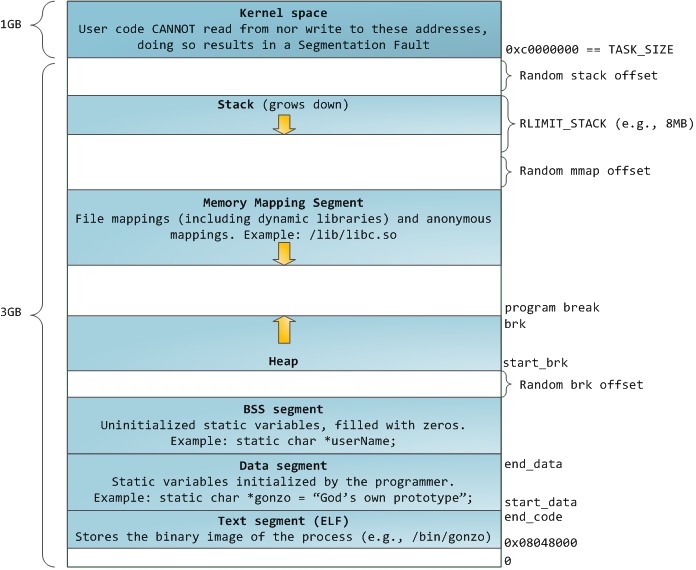
A program memory table can be shown as below (from internet)


Thursday, 26 December 2013

linux memory buffers vs cached


in the memory commands output such as 'vmstat', the item buffers or cached is sometimes confusing.

let's do some testings to show what is the difference:

what is buffers:


Here is the output after I did the ‘ls –al ’ command. You will see the buffer information increased a little. It is because the ls –al will get the directory content (not the file content) which is the meta data of the file system.

Another example is 


 free                                         //check the current memory usage including buffers and cached
 time find . > /dev/null                //print whole files name and checked the time usage
 free                                         //check the current memory usage again
 time find . > /dev/null                // print whole files name and checked the time usage again
 free                                         //check the current memory usage again

here are the testing results:
1.     In step 2, lots of buffers are used and the find command used about 9 seconds. No cached memory is used.
2.     In step 4, same commands neither buffers nor cached is used as the results is stored in buffers. The find command is much quicker (0.2 seconds).

what is cached:


Then let’s check how the cached is used. Testing scripts are
free                  //check the current memory usage including buffers and cached
man pwd           // check the man page for ps command
free                  //check the current memory usage including buffers and cached again
man pwd           // check the man page for ps command again
free                  //check the current memory usage including buffers and cached again


here are the testing results:
1.     In step 2, a little cached is used no buffers memory is used.
2.     In step 4, same commands neither buffers nor cached is used as the results is stored in cached.

So there is the conclusion:
Buffers are associated with a specific block device, and cover caching of filesystem metadata as well as tracking in-flight pages. The cache only contains parked file data. That is, the buffers remember what's in directories, what file permissions are, and keep track of what memory is being written from or read to for a particular block device. The cache only contains the contents of the files themselves.